
Saved filters
The filter field in the toolbar takes a regex over the row label. Saved filters (the funnel button next to it) keep the ones you use, colour the rows they match, and can stop recording noisy transactions altogether.
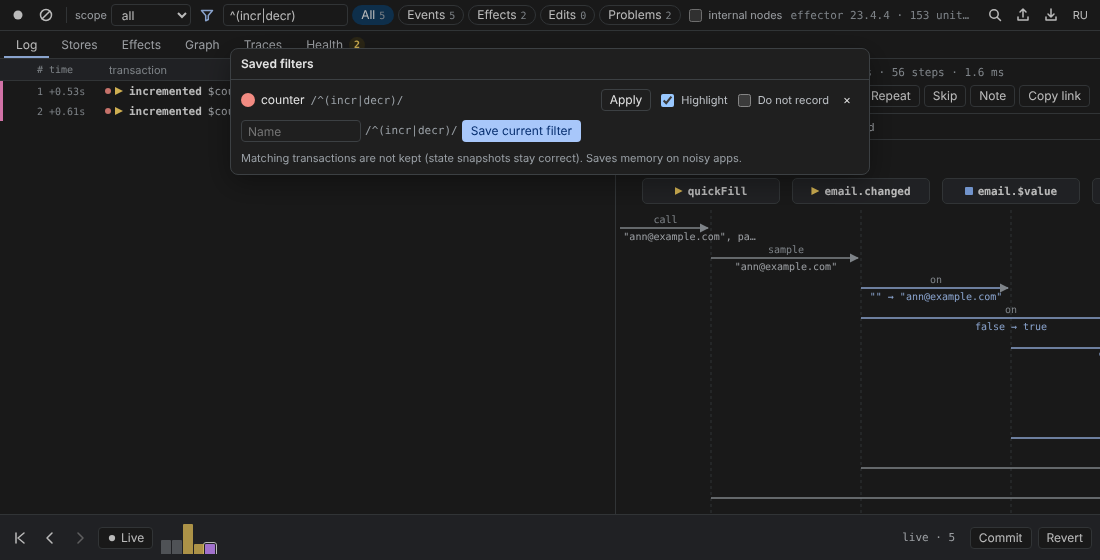
Save a filter
Type a regex into Filter by name (regex), open Saved filters, give it a Name (optional — the pattern is used otherwise) and press Save current filter. Each saved filter gets its own colour.
For every saved filter:
- Apply puts its pattern into the filter field;
- Highlight marks matching rows with a coloured dot in the Log (on by default);
- Do not record — matching transactions are not kept;
×removes it.
Patterns are case-insensitive. Saved filters are stored in the panel's localStorage per app name, so they survive reloads and DevTools restarts. Esc closes the popup.
Do not record
“Matching transactions are not kept (state snapshots stay correct). Saves memory on noisy apps.”
A polling timer, a mouse-move handler or a websocket heartbeat can push everything else out of the history. With Do not record, the agent still sees those transactions but keeps only their state changes — no steps, no payload — so jumping to an earlier or later moment still shows correct values; they are not sent to the panel and do not appear in the Log. The rule runs in the page, so it also saves the cost of sending them. It matches the name of the root unit (the effect, for an effect result) and applies only to calls from the app, never to actions started from deffector.
Try it in the lab demo: start the noisy polling and save a filter for pollTick with Do not record.