
Demos
The repository has one effector model (demo/shared) rendered in every supported setup. The model is built with the effector babel plugin, so sids are the same everywhere: a trace recorded in React replays in Vue, Solid or Next.js.
Live demo
The React demo runs on this site: open the live demo with the extension installed, then open DevTools → deffector. Its API is simulated in the page, so nothing leaves the browser.
Run
npm install                 # from the repository root
npm run build               # agent, demo/shared, extension, standalone
Load the extension from packages/extension/dist (see Installation); after a rebuild press ↻ on its card in chrome://extensions.
| Demo | Command | Address | What to try |
|---|---|---|---|
| React + Vite | npm run dev:react | http://localhost:5171 | the basic scenario, DeffectorProvider; ?standalone also connects to the standalone app |
| Vue + Vite | npm run dev:vue | http://localhost:5172 | withDeffector, the subtree is re-mounted on a jump |
| Solid + Vite | npm run dev:solid | http://localhost:5173 | DeffectorProvider for effector-solid |
| Global mode | npm run dev:global | http://localhost:5174 | no fork(): jumps in place, a warning in the banner and in Health |
| Without plugin | npm run dev:no-plugin | http://localhost:5175 | no sids: Health warns, names like $store@index.js:97, traces match by name |
| Node SSR | npm run standalone + npm run dev:node-ssr | http://localhost:5176, panel http://localhost:8686 | a scope per request in the standalone app |
| Next.js | npm run dev:next (+ npm run standalone for the server) | http://localhost:5177 | the client in the extension, the server in the standalone app |
| Lab | npm run dev:lab | http://localhost:5178 | big graphs (1–20 thousand units), an infinite loop, a stale read, an exception in .map, a unit leak, a timer outside of a scope, noisy polling; ?hydrate — server values for unknown sids; ?noagent — the same page without the agent |
What to click
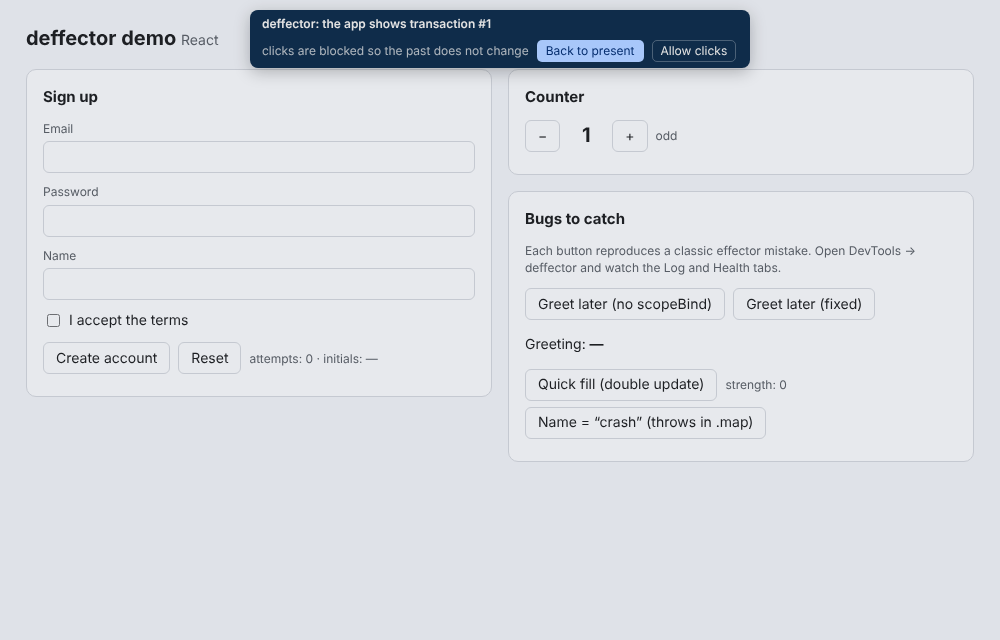
- Counter — the simplest case: the Log, jumping back (double-click a row, Ctrl+[ / Ctrl+], Esc for the present).
- Sign up — validation,
samplewithfilter(press Create account with an invalid form → “filter = false”), an effect with latency, email suggestions (the race between responses shows in Effects). An email containingtakenmakes the server fail. - Greet later (no scopeBind) — an event called from
setTimeoutwithoutscopeBind: a red “no scope” row, and the greeting never shows up in the UI. The button next to it is the fixed version. - Quick fill (double update) — a
combinedeclared before asampleis recomputed twice: a2×badge and the explanation in Why. - Name = “crash” — an exception in
.map: an error in the Log and in Health.
Things to check by hand
- Page lock. Double-click a row: the page is covered, a click changes nothing, Esc in the page returns to the present. Allow clicks in the panel banner — changes go to a branch.
- Saved filters (the funnel in the toolbar): save a regex, turn on Highlight — rows get a coloured dot; Do not record — matching transactions are not kept, yet jumps still show the right state.
- Snapshot (Stores → Snapshot →): paste
{ "sid": value }, look at the diff, apply. - Note and link on a transaction (buttons in the inspector); on export the selected step goes into
meta.focus, and the import opens the trace there. - Sequence — a tab in the inspector: units as lifelines, operators as arrows,
✕where a filter did not pass. - Override effects (Effects → Override effects): pending, a value, an error, latency, your own handler.
- Graph: the From → To path, groups by file / factory / domain / model (double-click expands), operator labels on edges.
- Ctrl+K — the command palette. A click on a file opens Sources at the line.
- Lab → Health: the emergency stop of a loop, “read $qty before it was updated”, “created N times”, “outside of scope”, a cycle through events only, Check derived stores.
- Firefox:
npm run build, thenabout:debugging→ This Firefox → Load Temporary Add-on →packages/extension/dist-firefox/manifest.json.
A trace between demos
Traces → Build JSON → Download .json. In a second window (or another demo) — Traces → paste → Check compatibility → Replay in a new scope. The password in the trace is masked with its length kept.
All demos are driven by the end-to-end tests: npm run e2e from the root.